Wednesday, March 30, 2016

What is 2-step verification and how to enable it

Enabling 2-Step Verification can add an extra layer of security to your Google Account. 2-Step Verification requires you to have access to your phone, as well as your username and password, when you sign in to your Google Account by following 2-step verification tutorial to enable it.

What is 2-step verification? Was invented in 1984, Two-factor authentication (also known as 2FA or 2-Step Verification) provides identification of users by means of the combination of two different components. These components may be something that the user knows, something that the user possesses or something that is inseparable from the user. A good example from everyday life is the withdrawing of money from a cash machine - only the correct combination of a bank card (something that the user possesses) and a PIN (personal identification number, something that the user knows) allows the transaction to be carried out. 2-step verification is ineffective against modern threats, like ATM skimming, phishing, and malware etc.

In conclusion, Two-step verification an extra layer of security requires you to have access to your phone, as well as your username and password, when you sign in to your Google Account. By using something you know (your password) and something you have (your phone), people can't sign in to your Google Account by trying to steal or guess your password. If you need a higher protection for important information in your email, let's enable 2-step verification!

Sunday, March 27, 2016

How to save gmail templates

You have to send an email with day by day with the content that almost the same? A daily report? Or a email that you want to send to many people and for each, you have to change some details, a invitation for example? In normal, you have to save the text somewhere then copy them in compose email window then change the information -> send, sometimes you may forget and save another text in clipboard. It's not hard to do but when Gmail can support you to do the same work, why you don't try it? See the full instructions in gmail templates.


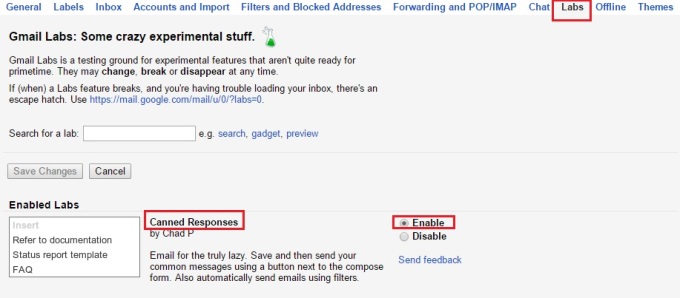
The feature will help you to save and then send your common messages using a button next to the compose form named "Canned Responses". First, to enable it, you have to click in the gear icon in the right side then choose settings. In the top of settings section, let's choose "Labs" tab, then choose enable. Scrolling to the bottom of Labs tab then choose "save changes".

When you compose a email that you want to send in many days or to many people, remember to leave a blank in the details that you will change it regularly, like date, name... When it's done, click the tiny arrow in the lower right corner of the compose window, choose "canned responses" (the second choice), and under the Save heading, select New Canned Response. Gmail will pop up a small box to ask you for the name of your response, just give it a name and click OK.

Then, the next time you compose a message with the same content, let's hit compose button, type your recipient's email address, then choose the tiny arrow last time to see your saved canned responses by move the mouse to "Canned Responses", under insert, choose one of your saved message to insert to your compose window, the subject of the email will be the name you choose for your saved templates

Change some details if you want then send it as always :)

Thursday, March 24, 2016

Forgot gmail password

Forgot Gmail Password: recover your Gmail password in few steps follow our tutorial. Follow the instruction in the article forgot gmail password to find the solution.

Gmail problems is no longer a matter when we are here :3 Tell us your problems and we'd love to help you solve it!!

Sunday, March 20, 2016

How to know if someone can sign in your Gmail


Although Google has a higly security policy for your Google Account, as well as Gmail, for example, if your account is signed in with a different IP address, Google will make that person verify their permission. It will be easy if it's youself, you know all your secret question, your phone with verification code. But sometimes, your account maybe hacked or if you've got a creeping suspicion that someone else is eyeing your inbox or you receive a weird email from someone you've never known about, you can check your "last activity" and that's what gmail login show you how to do.


In inbox view, scroll all the way down, and in the bottom right corner in tiny text, you'll see "Last account activity: X minutes ago". Click "Details," and Gmail will reveal exactly when each IP address accessed your account, plus what type of device they were using. If you find it unfamiliar, it's time for your to change to another stronger password to protect your information and messages. A article about it will appear soon in our blog.

Wednesday, March 16, 2016

Sign in using app passwords with Gmail

An App password is a 16-digit passcode that gives an app or device permission to access your Google Account, you only have to enter an App password once per app or device, even when you use 2-Step-Verification. Follow the instructions sign in using app passwords to use this tools in your phone.

Note: If you have iOS 8.3 on your iPhone or OSX 10.10.3 on your Mac, you will no longer have to use App passwords to use 2-Step Verification.

Sometimes, to protect your information, you set an strong password for each account, and you may be mistaken, with app password, you can sign in with only one password for every account. It's safe as long as this password is strong and unique.

Sunday, March 13, 2016

Gmail Login: How to change Gmail theme

If you usually use Gmail, have you ever thought about changing the bored plain white background to a more joyful picture, or a picture of your family's smile? Of course you can change the theme of your Inbox with many choice, using theme my Google or choose your own picture. Let's follow the instruction below.

1. Open your Gmail

2. Click the Gear button in top right of your Inbox, choose Theme.


You can choose any available themes, they are all free. The Gmail catalog has hundreds, including more high-resolution options, some of these include photographs taken by Google Staff.


After choosing a theme, you can customize some details of the theme further by three small button next to "cancel" button. Text background to change the text and widget in Gmail whether light or dark, Vignette to add the darker circle around your theme background and blue to add blur effect in your theme background.

You also able to upload your own themes, click the My photos button in bottom right. You can use your available photos, upload a new one from your computer or with an url...


Don't forget to click "Save" or "Select" after choosing a photo/theme you like.
Your Gmail nowadays is more interesting than ever ;) With the beautiful theme, may be a photo of you and your family will make you feel more comfortable when look at your inbox.
Let gmail login help you create your new Gmail, solve your sign in problem. Thank you!!!

Wednesday, March 9, 2016

Login to multiple accounts at once

The how-to guide to login to multiple Gmail accounts at once.

You have more than one Gmail account? You want to keep track of all of them without signing in then signing out? It's entirely possible with Gmail. Just follow the instruction in gmail login multiple accounts and now you can use all your Gmail account and need not type again and again your email address, just switch by a click~

Sunday, March 6, 2016

Communicate with Google Hangouts


Google Hangouts - the Google Voice and Video Chat tool that allow anyone with a computer, tablet or smartphone and a Google account - a Gmail - to communicate using audio, video or message for FREE.

With Google Hangouts, you can hold important meeting, remote interviews, exchange chat messages, hold video meetings with multiple people around the world at once. All you need is a computer, tablet, smartphone that has camera, speaker and microphone with stable internet connection.


Google Hangouts is a chance for you to meet and chat with celebrities through the screen, including President Obama, the Dalai Lama, David Beckham, Brad Pitt and many others. It's also used by prominent brands such as Cadbury, ASOS, Dell, Coca-Cola, Topman and Google itself, as well as a huge number of smaller companies and individuals.

By offering the option of a Google Hangout, you are benefitting from a range of features that will help you easily connect to your friends.
  • Google Hangouts is enables both one-and-one chats and group chats with up to ten people at a time.
  • Google Hangouts users can share documents, images, Youtube videos with other users.
  • Google Hangouts can be accessed via desktop computers, Android, iOS, Windows Phone mobile devices everywhere.
  • Google+ Hangouts also offeers a "Hangouts on Air" feature for broadcasting live video conversations that are accessible to anyone with a web browser.
Unlike some similar services, Google Hangouts focuses more in "face-to-face-to-face" group interaction as opposed to one-on-one video chats, and utilizes sophisticated tachnology to seamlessly switch the focus to the person currently chatting.

To join Google Hangouts and received its benefits, let gmail login help you create a Google account and solve all sign in problems.

Wednesday, March 2, 2016

Solve email problems

Having problems when signing in to your Gmail account? Select your issue and we guide you how to get rid of it.

There are many problems you can meet with your email. One of them is you cannot sign in your email address, gmail login problems will help you solve the most common troubles can happen.